
Aurora SQL Warm-up — Student Worksheet
Individual work
Context
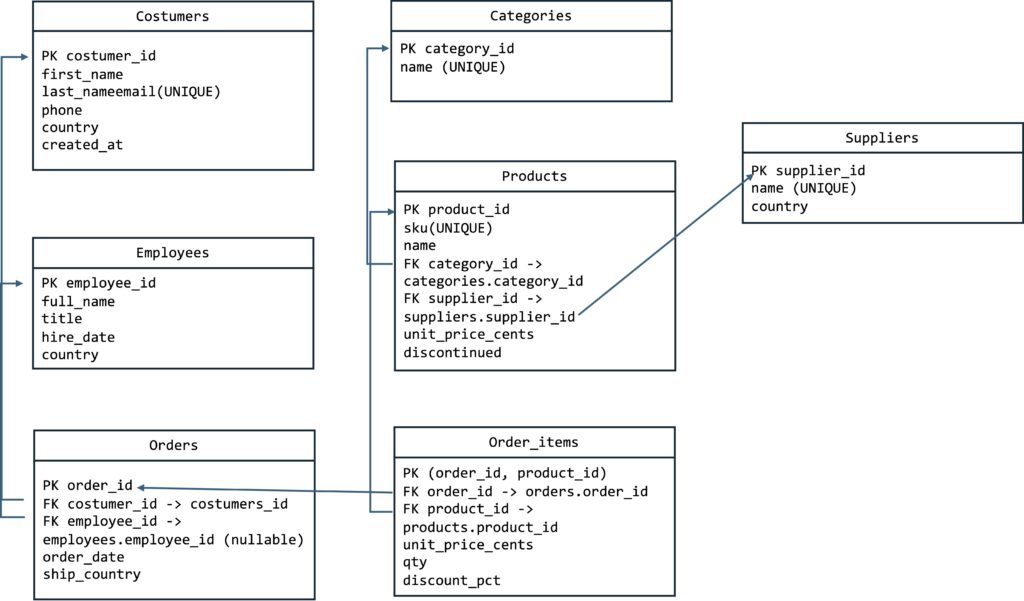
This worksheet accompanies the SQL warm-up dataset (classic retail schema) and is intended to support the expression of OLAP queries in a separate exercise.
Objective: Practise basic SQL syntax, filtering, joins, grouping, and subqueries.
SQL Memento: cheat sheets
Dataset: customers, employees, suppliers, categories, products, orders, order_items[1].
ToDo – ToTest
Execution Environment & Setup
There are two alternatives to have access to externalised PostgreSQL SQL environments with no installation burden required:
- Aurora PostgreSQL or Aurora MySQL (version ≥8) https://sqliteonline.com
- Create an account (attention! limited number of queries allowed! so avoid testing too much).
- Choose the PostgreSQL option.
- Use the following script to setup your environment:https://drive.google.com/file/d/1xt2DnQJFUMvURbz-cSUfgBaa954Mopqv/view?usp=sharing
- Use the following script to setup your environment:https://drive.google.com/file/d/1xt2DnQJFUMvURbz-cSUfgBaa954Mopqv/view?usp=sharing
- PostgreSQL externalized cloud (recommended)
- Create a free trial account on the PostgreSQL cloud https://aiven.io
- Create a PostgreSQL instance
- Access from Python
- Open in Colab the following GIST: https://gist.github.com/gevargas/71e5fc54a6f8f002a5fbe63974d02837
- Use the connection information provided by your Aiven instance.
Write and test the following queries
1) Peek at the first five rows of the customers table.
2) Show each customer’s full name and the year they joined (created_at).
3) Find all customers from France (country=’FR’).
4) List the newest customers, skipping the most recent one and taking the next two.
5) Find all customer emails containing ‘shop’.
6) List European customers (FR, ES, PT, DE) ordered alphabetically by country.
7) Show all employees with their titles using COALESCE if missing[2].
8) Count how many orders exist and how many distinct ship countries appear.
9) Count customers per country.
10) Show only countries having at least two customers (HAVING).
11) Display all orders with the customer’s full name and ship country.
12) List customers who have never placed an order.
13) Compute the line total for each order item including discount.
14) Show each order with its total revenue (sum of order items).
15) List products that were never ordered.
16) Find customers who have placed at least one order (EXISTS).
17) List orders placed in the last 30 days relative to now().
18) Compare UNION and UNION ALL results for customer and order countries.
19) Find all products with names containing ‘t-shirt’ (case-insensitive).
20) Show all products and mark whether each is discontinued.
Tip: Run your queries step-by-step and verify using COUNT(*) to estimate result sizes.
[1] Legend: PK = Primary Key, FK = Foreign Key, UNIQUE = Unique constraint.
[2] COALESCE is a function that returns the first non-NULL value in a list of expressions.
SELECT COALESCE(NULL, NULL, ‘Hello’, ‘World’); ‘Hello’